I'm a participant in the Amazon Services LLC Associates Program, an affiliate advertising program designed to provide a means for me to earn fees by linking to Amazon.com and affiliated sites.
The Brother MFC-L8930CDW and MFC-L3780CDW look similar on a spec sheet because both are color laser all-in-ones with duplex printing, single-pass two-sided scanning, fax, Ethernet, Wi-Fi, and 250-sheet paper trays.
But they are built for noticeably different workloads.
The Brother MFC-L3780CDW is the better fit for a home office or smaller business that wants a capable color laser without buying more printer than it needs.
The Brother MFC-L8930CDW is the better business machine. It prints somewhat faster, but its bigger advantages are elsewhere: an 80-sheet ADF, dramatically faster scanning, much higher-yield toner options, expandable paper capacity, a 7-inch touchscreen, and a higher recommended monthly volume.
That means the L8930CDW does not earn its higher price simply by printing two extra pages per minute.
It earns it when several people are using the printer, documents are constantly being scanned, or your business produces enough pages for the higher-capacity toner and paper options to matter.
Brother MFC-L8930CDW vs MFC-L3780CDW: The Short Answer
Buy the Brother MFC-L3780CDW if: you run a home office, small business, or relatively light workgroup and need a fast, full-featured color laser without the size and cost of the larger business model.
Buy the Brother MFC-L8930CDW if: multiple people share the printer, you scan large stacks frequently, print thousands of pages each month, or want to expand paper capacity later.
The most important difference: the L8930CDW is not dramatically better at basic printing. It is substantially better at handling office volume.
RTINGS currently recommends the MFC-L8930CDW as its top small-business and office printer, specifically citing its speed, sharp document output, high page yields, scanning performance, and low maintenance. The MFC-L3780CDW remains its less-expensive upper-midrange Brother alternative for offices that do not need the same level of throughput.
Quick Verdict
Choose the MFC-L3780CDW for most home offices and lighter small businesses. It already prints up to 31 ppm, has a 50-sheet single-pass duplex ADF, 250-sheet tray, 30-sheet multipurpose tray, fax, Ethernet, Wi-Fi, and automatic duplex printing.
Choose the MFC-L8930CDW when the printer itself is becoming part of your business workflow. It moves up to a larger 80-sheet ADF, much faster scanning, 50-sheet multipurpose tray, a 7-inch display, higher-yield TN635 toner, expandable paper capacity up to 1,340 sheets, and a recommended monthly volume of 5,000 pages.
If you only print a few hundred pages per month, much of that extra capability may sit unused.
Brother MFC-L8930CDW vs MFC-L3780CDW Comparison
Feature | ||
|---|---|---|
Printer | 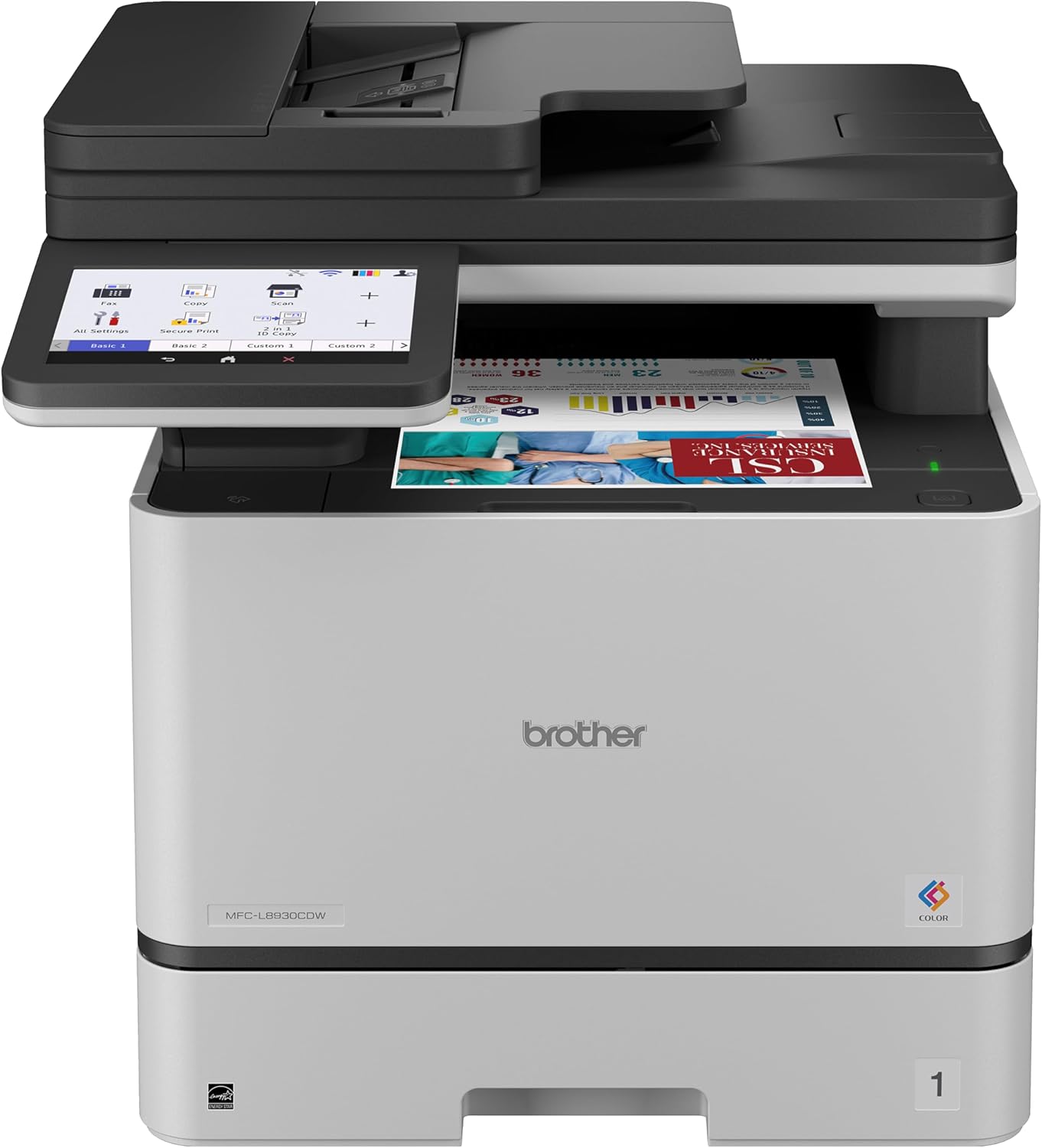 | 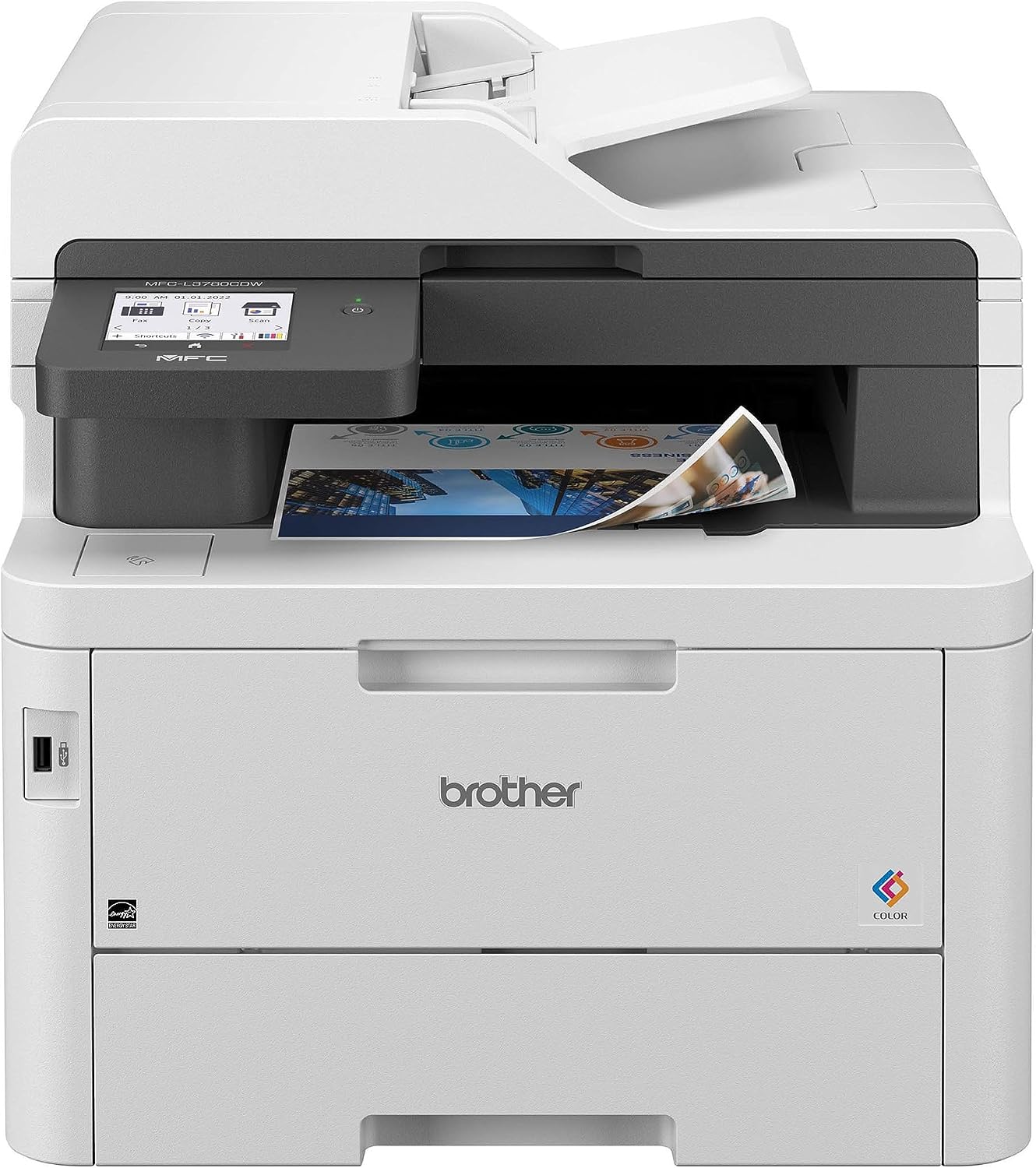 |
Best for | Busy small offices / workgroups | Home offices / lighter small businesses |
Print speed | Up to 33 ppm black or color | Up to 31 ppm black or color |
Recommended monthly volume | Up to 5,000 pages | Up to 4,000 pages |
Standard paper capacity | 250-sheet tray + 50-sheet multipurpose tray | 250-sheet tray + 30-sheet multipurpose tray |
Maximum expandable capacity | Up to 1,340 sheets | No comparable high-capacity expansion |
ADF | 80 sheets | 50 sheets |
Duplex scanning | Single-pass, up to 104 ipm B&W / 72 ipm color | Single-pass duplex; slower overall |
Display | 7-inch color touchscreen | 3.5-inch color touchscreen |
Toner family | TN635, up to 7,500 black / 6,500 color | TN229, up to about 4,500 pages with XXL options |
Weight | 58.4 lb | 47.8 lb |
Price |  | |
B&H currently lists both as print/scan/copy/fax color laser all-in-ones, but the business-oriented L8930CDW has the larger ADF, faster scanner, larger display, higher monthly rating, and more expandable paper system.
What’s Actually Different?
The first thing to understand is that the difference between these printers is not primarily print quality.
Both are designed to produce sharp office documents.
Both support:
- color laser printing
- automatic duplex printing
- duplex scanning
- flatbed scanning
- automatic document feeding
- copying
- fax
- Ethernet
- Wi-Fi
- USB
- Wi-Fi Direct
- AirPrint
- Mopria
Both also print at roughly 30 pages per minute.
So why pay more?
Because the MFC-L8930CDW is designed to keep moving when the office gets busier.
Its advantages start stacking up when you look at:
- scanning
- ADF capacity
- toner yield
- paper expansion
- monthly workload
- touchscreen size
- multipurpose paper capacity
- processor speed
- long-run office convenience
For occasional office printing, those differences may not matter.
For a workgroup processing documents all day, they absolutely can.
Printing Speed: Closer Than You Might Expect
The MFC-L8930CDW is rated at up to 33 pages per minute in either black or color.
The MFC-L3780CDW is rated at up to 31 pages per minute.
On paper, that is only a two-page-per-minute difference.
That means I would not spend substantially more on the L8930CDW solely because you want faster printing.
A ten-page document is not going to feel radically different.
Even a 50-page document is not enough by itself to explain the higher price.
RTINGS testing does show the L8930CDW as an extremely quick office printer, reaching roughly the mid-30-page-per-minute range in its testing, while the L3780CDW can also approach 30 ppm under favorable wired conditions.
One interesting complication is that RTINGS found the L3780CDW slowed significantly over Wi-Fi, reaching closer to 20 ppm in some black-document testing.
For an office chasing maximum throughput, Ethernet or USB is therefore preferable anyway.
Bottom line on printing speed
The L8930CDW wins.
But print speed alone is not the reason to buy it.
The scanner and consumables are much more important.
Scanning: This Is Where the L8930CDW Pulls Away
If your office scans frequently, this is probably the strongest argument for the L8930CDW.
The L3780CDW already has a good scanner.
It includes:
- flatbed scanning
- 50-sheet ADF
- single-pass duplex scanning
- up to 29 ppm black scanning
- up to 22 ppm color scanning
That is plenty for many home offices.
The L8930CDW moves into a different class.
Brother and B&H list:
- 80-sheet ADF
- 52 ipm simplex black scanning
- 36 ipm simplex color scanning
- 104 ipm duplex black scanning
- 72 ipm duplex color scanning
That is a major difference.
Feature | ||
|---|---|---|
Printer | | |
Best for | Busy small offices / workgroups | Home offices / lighter small businesses |
Print speed | Up to 33 ppm black or color | Up to 31 ppm black or color |
Recommended monthly volume | Up to 5,000 pages | Up to 4,000 pages |
Standard paper capacity | 250-sheet tray + 50-sheet multipurpose tray | 250-sheet tray + 30-sheet multipurpose tray |
Maximum expandable capacity | Up to 1,340 sheets | No comparable high-capacity expansion |
ADF | 80 sheets | 50 sheets |
Duplex scanning | Single-pass, up to 104 ipm B&W / 72 ipm color | Single-pass duplex; slower overall |
Display | 7-inch color touchscreen | 3.5-inch color touchscreen |
Toner family | TN635, up to 7,500 black / 6,500 color | TN229, up to about 4,500 pages with XXL options |
Weight | 58.4 lb | 47.8 lb |
Price | | |
Why 104 ipm Matters
Pages per minute and images per minute are not exactly the same measurement.
When duplex scanning, each side of a sheet counts as an image.
So a scanner rated at 104 images per minute can process both sides of documents extremely quickly.
For an office scanning:
- contracts
- medical paperwork
- applications
- invoices
- tax records
- client forms
- legal documents
- personnel records
that saves real time.
RTINGS specifically praises the L8930CDW’s scanner for handling large multipage, double-sided documents very quickly while maintaining strong scan quality.
Who probably doesn’t need this?
Someone who scans five pages twice a week.
The L3780CDW’s scanner is already more than sufficient for that.
Who may absolutely appreciate it?
An office where employees routinely walk up with 30-, 50-, or 80-page document stacks.
This is the clearest example of the difference between:
a good small-office printer
and
a printer designed to support a busy workgroup.
ADF Capacity: 80 Sheets vs 50 Sheets
The scanner-speed advantage becomes even more meaningful when combined with the ADF.
MFC-L3780CDW
50-sheet ADF
MFC-L8930CDW
80-sheet ADF
Thirty additional sheets does not sound dramatic until scanning becomes repetitive office work.
With an 80-page contract:
L3780CDW
You may need to split the job.
L8930CDW
Load the stack and go.
That is the kind of workflow improvement businesses actually notice.
Toner: The L8930CDW Has a Major High-Volume Advantage
This is the other big reason the more expensive printer exists.
The L3780CDW uses Brother TN229-series toner.
The L8930CDW uses the newer business-oriented TN635-series toner.
Both offer high-yield options.
The L8930CDW simply scales farther.
MFC-L8930CDW Toner Yields
Brother offers several TN635 sizes.
Standard yield
- Black: up to 3,000 pages
- Color: up to 1,800 pages each
High yield
- Black: up to 5,500 pages
- Color: up to 4,500 pages each
Super high yield
- Black: up to 7,500 pages
- Color: up to 6,500 pages each
Those are serious office yields.
The super-high-yield cartridges are particularly important because they reduce how often a busy office needs to stop and replace supplies.
MFC-L3780CDW Toner Yields
The L3780CDW uses Brother’s TN229 cartridge family.
It is available in:
- standard
- high yield
- super-high-yield / XXL configurations
The largest TN229 XXL cartridges reach approximately 4,500 pages in black and around 4,000 pages for the color cartridges, depending on the cartridge. Brother lists its XXL cyan cartridge at up to 4,000 pages, for example.
Those are still respectable yields.
They just do not reach the TN635XXL levels.
Why Higher Toner Yield Matters
Suppose your office prints 5,000 pages every month.
A cartridge that yields 7,500 pages means fewer replacements than one yielding around 4,000–4,500.
That means:
- fewer interruptions
- fewer spare cartridges to keep on hand
- fewer supply changes
- potentially lower cost per page
- less employee time spent managing the printer
RTINGS specifically identifies the L8930CDW’s higher page yield as one of the primary reasons it is better suited to heavier office workloads.
For a home office printing 400 pages a month, that difference becomes much less important.
Monthly Volume: 5,000 vs 4,000 Recommended Pages
B&H lists:
MFC-L8930CDW
- Maximum duty cycle: 60,000 pages
- Recommended monthly volume: 5,000 pages
MFC-L3780CDW
- Maximum duty cycle: 50,000 pages
- Recommended monthly volume: 4,000 pages
Do not confuse maximum duty cycle with the amount you should routinely print.
The recommended monthly volume is the much more useful number.
A printer may technically survive a very high peak month without being designed to live there every month.
What Those Numbers Mean in Practice
500 pages per month
Get the L3780CDW.
You are nowhere near the volume where the L8930CDW’s office advantages are necessary.
1,500 pages per month
Still probably L3780CDW unless scanning demands are unusually heavy.
3,000 pages per month
Now the decision becomes more interesting.
Both can handle it, but the larger toners and faster scanner start making the L8930CDW easier to justify.
4,000 to 5,000 pages per month
I would favor the L8930CDW.
You are operating in exactly the environment it was designed for.
Above 5,000 pages every month
I would start evaluating not only the L8930CDW but whether you need an even higher-volume workgroup printer.
Paper Capacity: Same Starting Point, Very Different Ceiling
Out of the box, the difference is smaller than you might expect.
MFC-L3780CDW
- 250-sheet main tray
- 30-sheet multipurpose tray
MFC-L8930CDW
- 250-sheet main tray
- 50-sheet multipurpose tray
For ordinary letter paper, both start with the same 250-sheet cassette.
That is enough for many small offices.
The difference is what happens when 250 sheets is no longer enough.
The L8930CDW Can Expand to 1,340 Sheets
Brother offers optional trays for the L8930CDW.
Brother says total capacity can be expanded to up to 1,340 sheets.
Available accessories include:
- optional 250-sheet LT-350CL tray
- optional 520-sheet LT-360CL tray
That changes the printer’s role.
Instead of constantly loading paper, you can configure it for a much larger workgroup.
Optional trays can also make it easier to keep different media loaded.
For example:
- Tray 1: letterhead
- Tray 2: plain letter
- Multipurpose tray: envelopes or specialty paper
That matters in an office.
It matters much less when one person works from a spare bedroom.
Multipurpose Tray: 50 Sheets vs 30 Sheets
The L8930CDW also has a larger multipurpose tray.
L8930CDW
50 sheets
L3780CDW
30 sheets
Both support heavier paper up to 43 lb through the multipurpose feed according to B&H’s specifications.
That tray is particularly useful for:
- envelopes
- letterhead
- labels
- heavier media
- special forms
The L3780CDW can do these jobs.
The L8930CDW simply requires less frequent reloading.
Again, that is the recurring pattern in this comparison.
Touchscreen: 7 Inches vs 3.5 Inches
This difference looks cosmetic.
In an office, it is more useful than that.
MFC-L3780CDW
3.5-inch color touchscreen
MFC-L8930CDW
7-inch color touchscreen
That is twice the diagonal size.
Brother also allows the L8930CDW to create up to 64 customized shortcuts for commonly used workflows.
Those can include tasks like:
- scan to email
- scan to network folder
- scan to SharePoint
- scan to SFTP
- scan to cloud
- copy presets
- workflow shortcuts
For one person, a larger screen may just be nice.
For ten employees sharing the machine, it can reduce friction.
Scan-to-Workflow Features Favor the Business Model
Brother specifically positions the L8930CDW for more sophisticated scanning destinations.
It supports direct scanning to locations including:
- cloud services
- SharePoint
- SSH/SFTP servers
and can create searchable or editable Microsoft Office documents.
This is where a printer starts becoming a document-processing terminal rather than just something that puts toner on paper.
If your office simply scans documents to one computer, you do not need to pay for that.
If staff repeatedly digitize records into shared systems, it can save time.
Connectivity Is Strong on Both
Both printers support the connections most offices need:
- Ethernet
- Wi-Fi
- Wi-Fi Direct
- USB
- AirPrint
- Mopria
- Brother Mobile Connect
The L8930CDW also supports dual-band 2.4 GHz / 5 GHz wireless and Gigabit Ethernet.
RTINGS additionally notes NFC support on the L8930CDW, which can be used for phone pairing or ID-badge workflows.
That can matter in managed office environments where access control or secure release matters.
For most home users, it will not.
Processor: Another Small Business Advantage
B&H lists:
MFC-L8930CDW
1.2 GHz processor
MFC-L3780CDW
800 MHz processor
Both have 512 MB of memory.
Processor specifications are rarely worth obsessing over on a printer.
But they help explain why the larger model is better equipped to handle:
- complex jobs
- multiple users
- document processing
- advanced scanning workflows
Again, think workgroup rather than individual user.
Size: The L3780CDW Is Much Easier to Live With
The L8930CDW’s office advantages have a physical cost.
It is a much larger machine.
MFC-L3780CDW
Approximately:
18.2 x 16.1 x 15.8 inches
Weight:
47.8 pounds
MFC-L8930CDW
Approximately:
17.9 x 19.9 x 18.1 inches
Weight:
58.4 pounds
The L8930CDW is actually slightly narrower, but it is substantially deeper and taller.
It is also more than 10 pounds heavier.
This Is Not a Desk Printer for Most People
RTINGS specifically calls the L8930CDW large and cumbersome and notes that it makes more sense in a dedicated office space.
That is worth considering before clicking Buy.
The L3780CDW can fit much more comfortably into:
- home offices
- shared desks
- cabinets
- small office corners
The L8930CDW wants its own space.
And once you add optional paper trays, it becomes even more of a floor-standing office setup.
Print Quality: Both Are Strong
Do not buy the L8930CDW because you expect documents to suddenly look twice as good.
Both printers are strong office document machines.
B&H lists the same maximum print resolution class of 2400 x 600 dpi on both.
RTINGS describes the L3780CDW’s document quality as fantastic and the L8930CDW’s as extremely sharp.
For:
- reports
- forms
- contracts
- spreadsheets
- presentations
- charts
- business correspondence
both perform well.
The larger printer’s advantage is getting more of those documents through the office more efficiently.
Neither Is a Photo Printer
Both are color laser printers.
That does not mean they should be used as photo printers.
Laser excels at:
- text
- business graphics
- charts
- logos
- diagrams
- presentations
It is much less suited to:
- borderless photographs
- glossy photo paper
- detailed photographic gradients
RTINGS specifically notes that the L8930CDW has limited photographic color reproduction and does not support glossy photo output.
If your business prints photographs or high-quality marketing imagery, a photo-oriented inkjet or business ink tank may make more sense.
MFC-L3780CDW for a Home Office
This is where the smaller printer has a very strong case.
A home office rarely needs:
- 80-sheet ADF
- 1,340-sheet expansion
- 7-inch screen
- 7,500-page toner
- 5,000-page monthly recommendation
But it may still need:
- excellent document printing
- color
- fax
- duplex scanning
- Ethernet
- automatic duplex printing
- fast output
The L3780CDW already does all of that.
Its 31 ppm speed is more than enough for most individual professionals.
Its 50-sheet ADF is generous.
Its 250-sheet tray means you are not constantly loading paper.
And it occupies much less space.
Best home-office use cases
- accountant
- therapist
- attorney
- consultant
- insurance professional
- remote manager
- small online business
- freelancer
- real estate professional
For one or two users, I would usually save the money and space.
MFC-L8930CDW for a Small Office
This is where the bigger printer starts earning its price.
Imagine an office with six employees.
Throughout the day:
- someone prints a 60-page report
- another person scans a 40-page contract
- someone else prints invoices
- another employee copies a packet
- the administrator scans 70 pages of records
- someone needs envelopes from the multipurpose tray
Now the differences matter.
The larger ADF matters.
The faster scanner matters.
Higher-yield toner matters.
Paper expansion matters.
The bigger screen matters.
RTINGS currently places the L8930CDW at the top of its small-business recommendations for exactly this kind of workload.
Who Should Buy the Brother MFC-L3780CDW?
The L3780CDW is the smarter choice for most buyers who describe their needs as:
“I need a really good color laser all-in-one.”
Choose it if:
- one or two people use the printer
- you print under a few thousand pages monthly
- scanning is regular but not constant
- 250 sheets is enough
- space matters
- you do not need a huge touchscreen
- saving money upfront matters
You still get an unusually complete machine.
The L3780CDW already includes:
- 31 ppm printing
- color laser
- automatic duplex
- 50-sheet ADF
- single-pass duplex scanning
- fax
- Ethernet
- Wi-Fi
- touchscreen
- 250-sheet tray
- 30-sheet multipurpose feed
That is enough printer for a lot of businesses.
Who Should Buy the Brother MFC-L8930CDW?
The L8930CDW makes sense when you can point to a specific workflow problem the cheaper printer does not solve as well.
Choose it if:
- several employees share the printer
- you scan large document stacks
- scanning speed matters
- you print several thousand pages per month
- you want very high-yield toner
- you need additional paper trays
- your printer frequently handles envelopes or special media
- you want customizable workflows
- you need an office-oriented 7-inch interface
- NFC or advanced document routing is useful
This is not just a premium version.
It is the model designed to absorb heavier work.
When Is the L8930CDW Worth Paying More?
Because printer prices change constantly, I would not base the article around one fixed dollar amount.
But the logic is straightforward.
If the price difference is small
Buy the L8930CDW.
You are getting a materially more scalable machine.
If the difference is around $100 to $150
This is where workload matters.
For a busy office, I would still choose the L8930CDW.
For a home office, I would probably take the savings and buy the L3780CDW.
B&H recently showed roughly a $130 difference between the two base printers, though retail prices can change.
At that kind of gap, the L8930CDW is easy to justify if you will use its business features.
If the difference becomes $200 or more
The L3780CDW becomes much more compelling for lighter users.
Remember that print quality and basic functionality are already strong.
Do not pay hundreds more for an 80-sheet ADF if you scan 15 pages per month.
Toner Costs Matter More Than Purchase Price for High-Volume Offices
This is where businesses should think differently from home users.
A home user may keep the printer for five years and print 500 pages per month.
A busy office may print that in a few days.
At high volume, consumables can eventually cost much more than the printer itself.
That makes the L8930CDW’s TN635XXL options particularly important.
Brother’s super-high-yield supplies reach:
- 7,500 black pages
- 6,500 color pages
RTINGS also highlights the model’s outstanding page yields and low cost per print as major advantages for business use.
The L3780CDW remains economical.
But the L8930CDW gives heavy users more room to optimize supply replacement.
What About Drum Replacement?
Both are Brother laser printers with consumables beyond toner.
That includes components such as:
- drum units
- belt
- waste toner box
On the L8930CDW, Brother rates the DR635CL drum at approximately 30,000 pages, while the belt and waste toner box are rated around 50,000 pages.
Those components therefore last far longer than ordinary toner cartridges.
Still, businesses calculating total cost of ownership should include them rather than comparing toner alone.
Is the Larger Touchscreen Worth Paying For?
By itself?
No.
A 7-inch screen does not justify the price difference.
But in a multi-user environment, it complements the rest of the machine.
The L8930CDW can create up to 64 workflow shortcuts.
That lets an office simplify tasks such as:
- Scan to Accounting
- Scan to HR
- Email Client Copy
- Scan to SharePoint
- Copy Double-Sided
- Scan to SFTP
Instead of teaching every employee a complicated menu path, you create a button.
That is where a large touchscreen stops being cosmetic.
Frequently Asked Questions
Which is better, the Brother MFC-L8930CDW or MFC-L3780CDW?
The MFC-L8930CDW is the more capable printer, particularly for busy offices. It has faster scanning, an 80-sheet ADF, higher-yield toner options, expandable paper capacity, a larger touchscreen, and a higher recommended monthly volume.
The MFC-L3780CDW is the better value for lighter workloads.
Is the MFC-L8930CDW much faster?
Not dramatically for basic printing.
It is rated at up to 33 ppm compared with 31 ppm for the L3780CDW.
Its much larger speed advantage is in scanning.
Which one scans faster?
The MFC-L8930CDW.
Brother lists duplex scanning at up to 104 ipm black and 72 ipm color, with a 52 ipm black simplex rate.
The L3780CDW is rated around 29 ppm black and 22 ppm color for scanning.
Which printer has the larger ADF?
The MFC-L8930CDW.
It holds up to 80 sheets, compared with 50 sheets on the L3780CDW.
Do both have duplex scanning?
Yes.
Both support single-pass duplex scanning, meaning they can capture both sides of a document automatically.
Do both print automatically on both sides?
Yes.
Both support automatic duplex printing.
Which printer has cheaper toner?
That depends on current cartridge pricing and which yield size you buy.
The larger advantage of the MFC-L8930CDW is that its TN635 family offers much higher maximum yields, reaching up to 7,500 pages black and 6,500 pages color.
Which printer holds more paper?
Out of the box, both have a 250-sheet main tray.
The L8930CDW also has a larger 50-sheet multipurpose tray and can be expanded to up to 1,340 sheets total with optional trays.
Which is better for a home office?
The MFC-L3780CDW usually makes more sense.
It is smaller, cheaper, and already has most of the important functionality.
Which is better for a small business?
For a busy multi-user small business, I would choose the MFC-L8930CDW, particularly if the office scans frequently or prints several thousand pages each month.
RTINGS currently recommends it as its best small-business printer.
Does the L8930CDW have fax?
Yes.
Both models support print, scan, copy, and fax.
Do both have Ethernet?
Yes.
Both support wired Ethernet networking in addition to wireless connections.
Is the L8930CDW good for photos?
Not particularly.
It is designed for office documents rather than photographic printing. Color laser is excellent for charts, presentations, logos, and business graphics but is not a replacement for a photo inkjet.
Final Verdict: Pay More for Workload, Not for Two Extra Pages Per Minute
The Brother MFC-L8930CDW is the better printer, but its advantage is easy to misunderstand.
Do not buy it because 33 ppm sounds significantly faster than 31 ppm.
That is not where your money is going.
You are paying for:
- an 80-sheet ADF instead of 50 sheets
- dramatically faster scanning
- higher-yield toner
- a larger multipurpose tray
- expandable paper capacity
- a 7-inch touchscreen
- more advanced document workflows
- a higher recommended monthly volume
- a machine designed for several people to use all day
That makes the MFC-L8930CDW the better choice for a busy small office or workgroup.
RTINGS’ current 2026 testing reaches much the same conclusion, positioning the L8930CDW above the L3780CDW specifically for heavier office workloads because of its faster print and scan speeds and higher page yields.
The MFC-L3780CDW is the smarter value for home offices and lighter businesses.
It already gives you:
- fast 31 ppm printing
- excellent office document quality
- 50-sheet duplex ADF
- automatic duplex printing
- fax
- Ethernet
- Wi-Fi
- 250-sheet paper capacity
For one or two users, that is a lot of printer.
The easiest way to choose is to look at the jobs waiting beside the scanner.
A few documents each day? Buy the MFC-L3780CDW.
Stacks of documents, multiple employees, and thousands of pages each month? Buy the MFC-L8930CDW.
The more your printer functions like shared office infrastructure rather than a personal peripheral, the more worthwhile the L8930CDW becomes.